Problem set 3: WeensyOS
In this assignment, you will add new features to a tiny operating system: process memory isolation, virtual memory, and some system calls.
-
Pset 3a: Phases 1–5 are due at the 11:59pm EDT on Tuesday 10/13.
-
Pset 3b: Three additional phases, due on Sunday 10/18.
You may want to read Chapter 9 of the textbook. Specifically, the
64-bit x86 virtual memory architecture is described in Section 9.7;
the PTE_P, PTE_W, and PTE_U bits are shown in Figure 9.23 and
discussed in Section 9.7.1.
Get the code
The p-fork.cc and p-exit.cc programs that exercise pset 3b functionality
are new. Get them with
$ git pull; git pull --no-rebase handout main
or, alternately
$ git pull; git pull --no-rebase https://github.com/cs61/cs61-f26-psets.git main
This will merge our pset 3b code with your previous work.
Running WeensyOS
To launch WeensyOS, open a Docker container with ./cs61-run-docker, then cd pset3; make run. You should see something like this, which shows four related
p-allocator processes running in parallel:
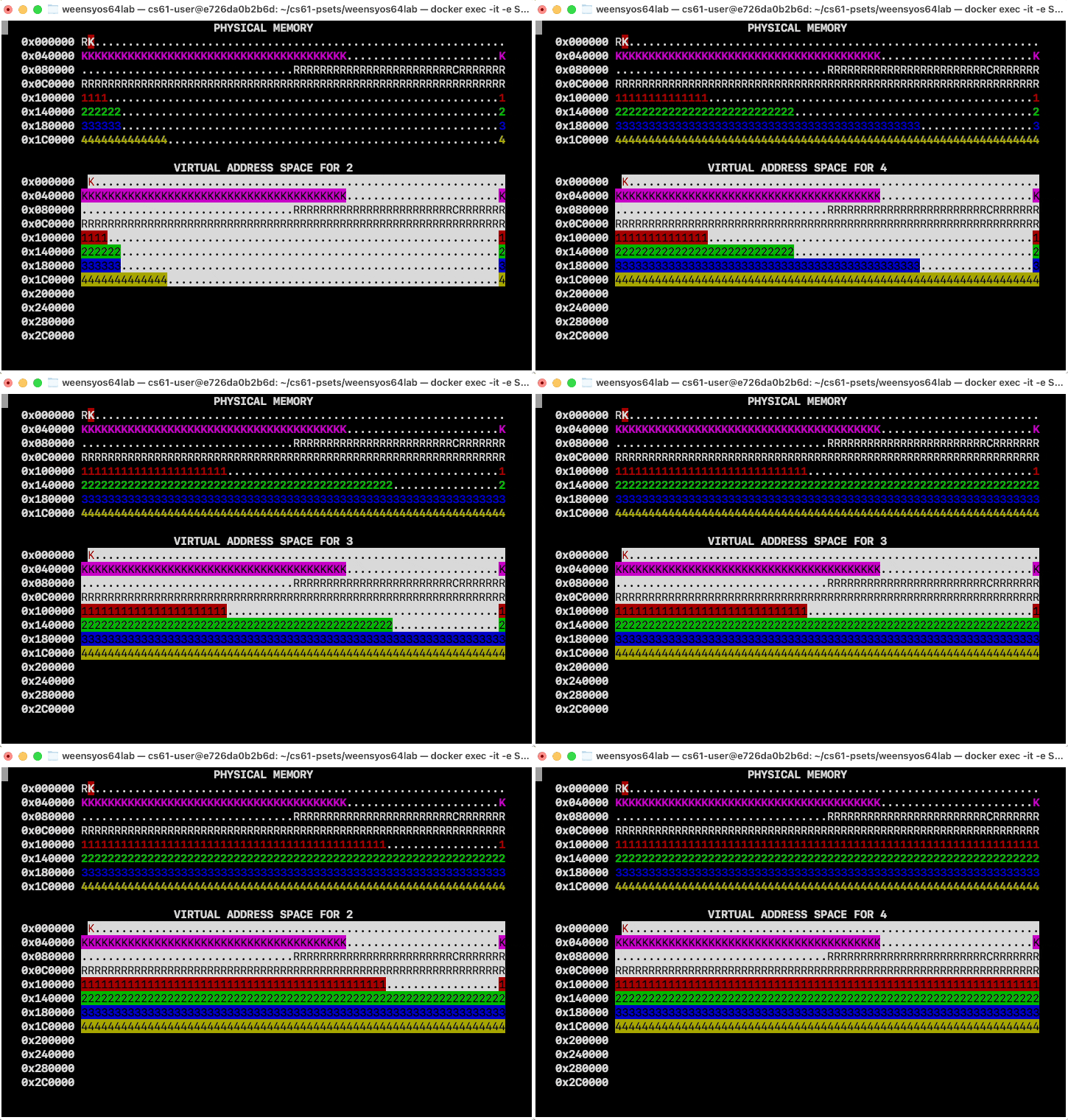
The image above loops forever; in an actual run on your real computer,
the bars will move to the right and stay there. Don’t worry if your
image has different numbers of K’s or otherwise has different details.
(If your bars run painfully slowly, edit the p-allocator.cc file
and reduce the ALLOC_SLOWDOWN constant.)
The WeensyOS documentation has more information on how to build WeensyOS and how to run it in different modes, including modes that output more debugging information. Some highlights:
-
It is much easier to work on this pset in Docker. The pset will not build on native Mac OS X or Windows.
-
We do not recommend storing your pset files in a directory that is automatically backed up to the cloud (Microsoft OneDrive, Apple iCloud). Automatic backups are likely to disrupt the functioning of the QEMU emulator that runs WeensyOS.
-
Only one QEMU will run at a time. If
make runreports an error likeFailed to get "write" lock, this means that some other tab is running the QEMU emulator in the same directory. Trymake stopto kill that other tab and thenmake runagain.
Initial state
WeensyOS displays the current state of physical and virtual memory. Each character represents 4 KiB of memory (i.e., a single x86-64 page). There are 2 MiB of physical memory in total. (How many pages is this?) Here are two labeled physical memory diagrams, showing what the characters mean and how memory is arranged.
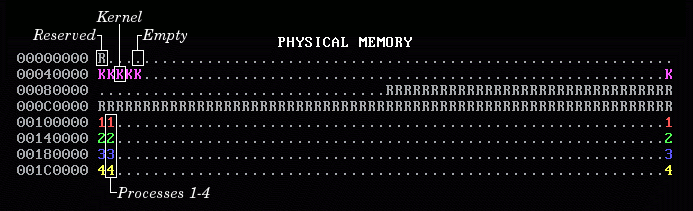
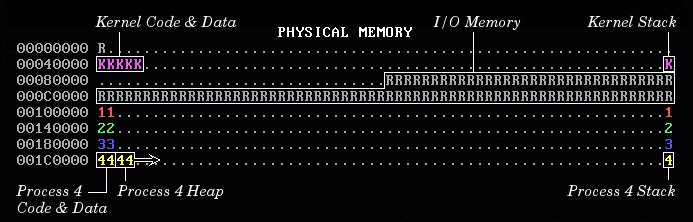
The virtual memory display is similar, but it may contain blank spaces as well. A blank virtual memory page corresponds to an unmapped page, and when a process (or the kernel) tries to access such an address, the processor will page fault.
The handout version of WeensyOS runs four processes, 1 through 4. Each process
runs a different program. The four programs are compiled from the same source
code (p-allocator.cc), but for each program the compiler is told to use a
different region of memory for its text and data segments. Each p-allocator
asks the kernel for more heap space, one page at a time, until it runs out of
room. Each process’s heap begins just above its code and global data, and ends
just below its stack. The processes allocate space at different rates: Process
2 allocates space twice as quickly as Process 1, Process 3 goes three times
faster, and Process 4 goes four times faster. (A random number generator is
used, so the exact rates may vary.) The marching rows of numbers show how
quickly the heap spaces for processes 1, 2, 3, and 4 are allocated.
Although the virtual memory display cycles between the four processes’ address spaces, in the handout code the display won’t change much from process to process, because all the address spaces are the same. This means that there is no memory isolation between processes—something you must fix!
In the virtual memory display, a character is reverse video (i.e., black foreground and colored background) if an application process is allowed to access the corresponding address. Initially, any process can modify all of physical memory, including the kernel. This means that memory is not properly isolated!
Goal
You will implement complete and correct memory isolation for WeensyOS processes. Then you'll implement full virtual memory, which will improve utilization of physical RAM.
This assignment has lots of support code, but the code you write should all go
in kernel.cc.
There is no make check functionality for this pset. Instead, you should run
your instance of WeensyOS and visually compare it to the images
in the pset description.
Phase 1: Kernel isolation
WeensyOS processes could stomp all over the kernel’s memory if they wanted to.
Better stop that! Change kernel_start, the kernel initialization function, so that
kernel memory is inaccessible to applications—except for the memory holding
the CGA console (the single page at CONSOLE_ADDR == 0xB8000).
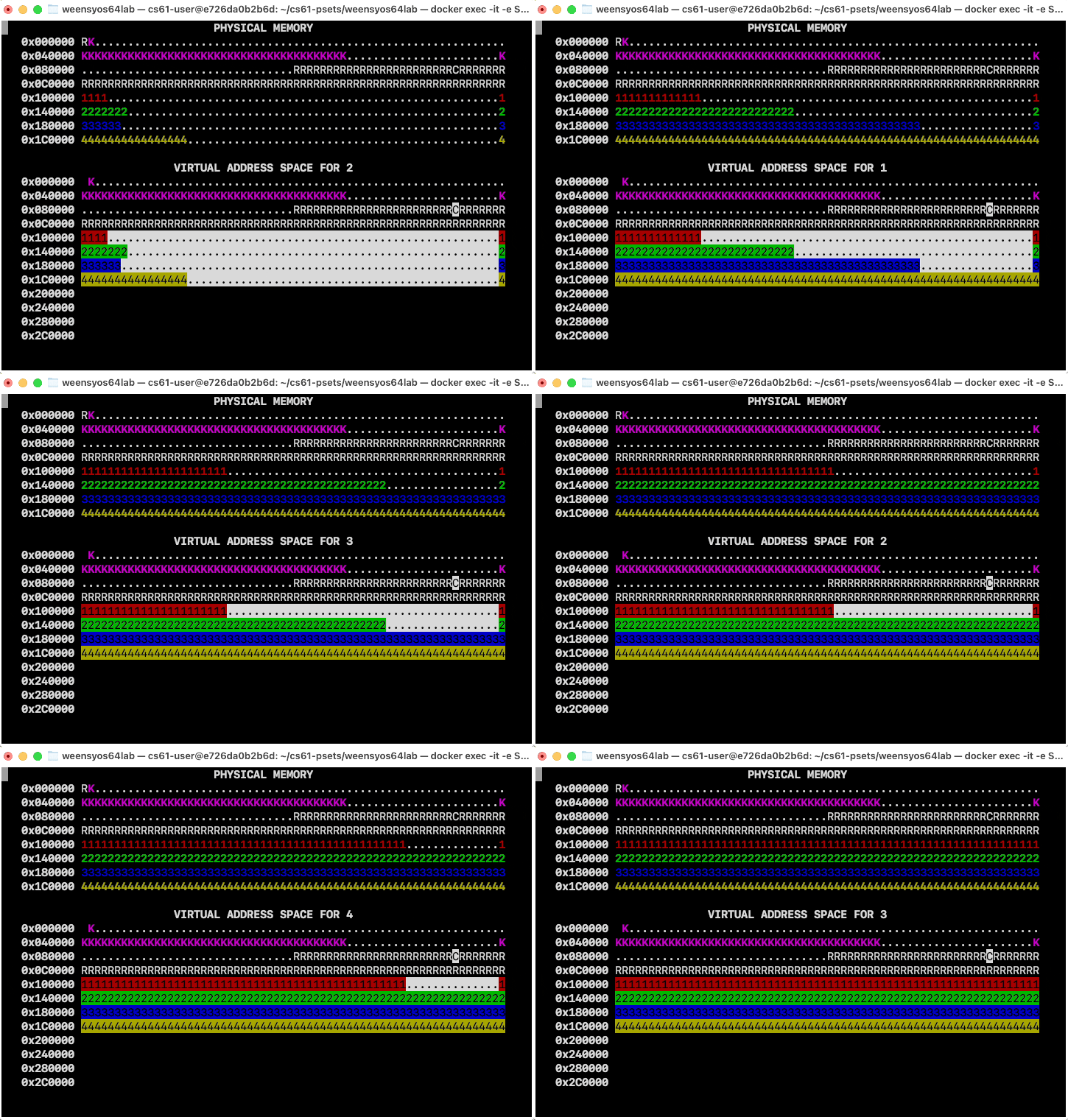
When you are done, WeensyOS should look like this. In the virtual map, kernel memory is no longer reverse-video, since the user can’t access it (except for the CGA console).
Use vmiter to create memory mappings. Start from the vmiter loop in
the kernel_start function.
About virtual memory iterators (
vmiter)
WeensyOS memory layout
The identity-mapped
kernel_pagetable
If you get stuck or confused, read the debugging notes on this page!
In addition, make sure that your sys_page_alloc system call preserves kernel
isolation: Applications shouldn’t be able to use sys_page_alloc to screw up
the kernel. This requires changes to the SYSCALL_PAGE_ALLOC case in
syscall. Read the description of sys_page_alloc in u-lib.hh to get a
feeling for the possible errors.
Phase 2: Isolated address spaces
Implement process isolation by giving each process its own independent page table. Your OS should look like this:
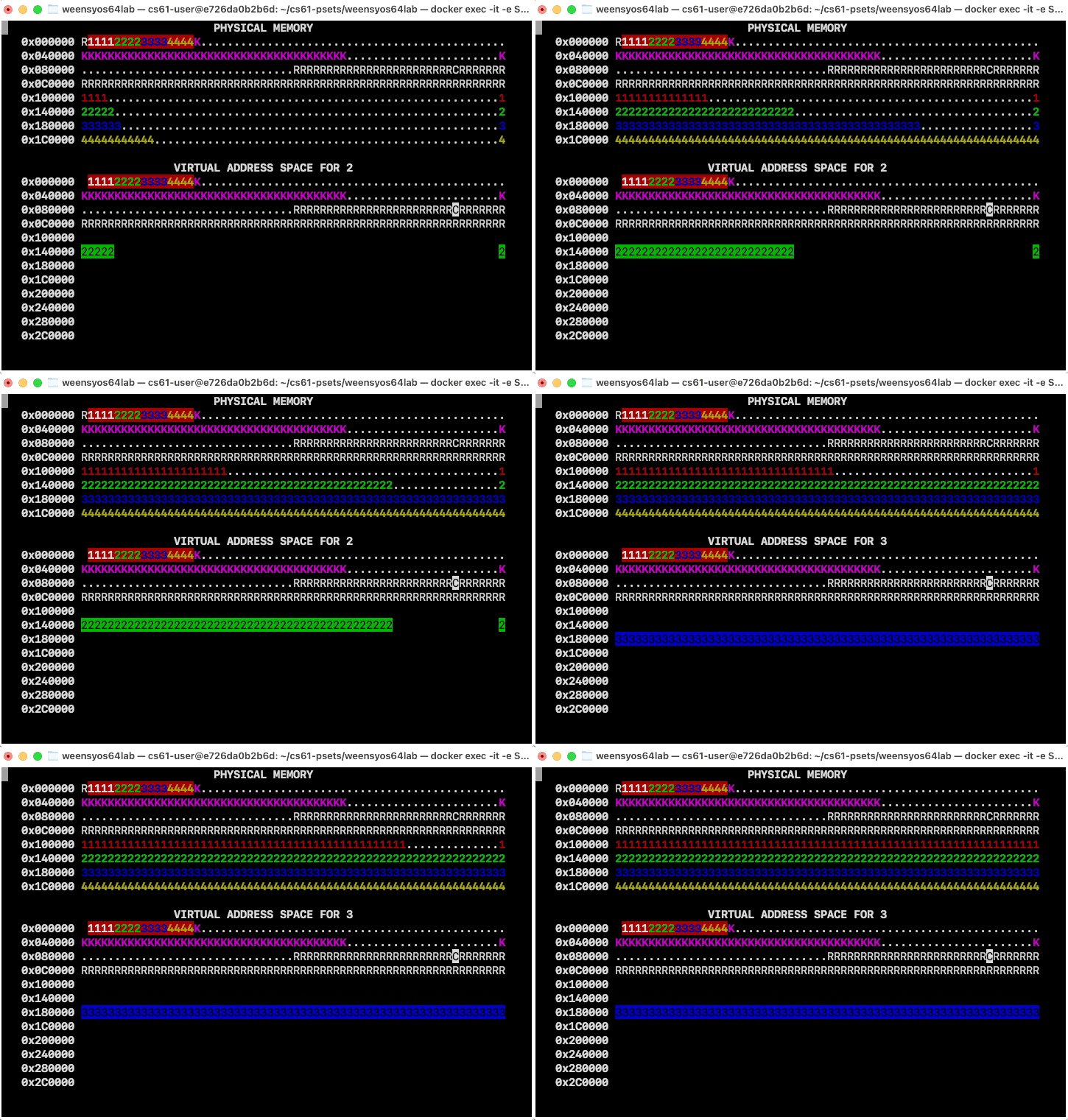
Each process only has permission to access its own pages, which you can tell because only its own pages are shown in reverse video.
How to implement per-process page tables in process_setup:
-
Allocate a new, initially-empty page table for the process by calling
kalloc_pagetable. (Try the shell commandgrep "kalloc_pagetable" *to find where this function is defined!) -
Copy the mappings from
kernel_pagetableinto this new page table usingvmiter::try_map. This ensures that the required kernel mappings are present in the new page table. All user page tables should match thekernel_pagetableup toPROC_START_ADDR, when they start differing fromkernel_pagetableand from each other. You can do this using a loop with twovmiters, or you can set the mappings yourself (they are identity mappings).Note:
vmiter::try_mapwill allocate page table pages as needed. All calls totry_mapinprocess_setupare guaranteed to succeed. (That won’t be true for later parts of the pset.) Inprocess_setup, feel free toassertthat the return value fromtry_mapis 0 (or callvmiter::mapinstead). -
Then you will need to make sure that any page that belongs to the process is mapped as user-accessible. These are the pages the process needs to access, including its code, data, stack, and heap segments. There are several places you’ll need to change.
Note the diagram now has four pages for each process in the kernel area,
starting at 0x1000. These are the four-level page tables for each process.
(The colored background indicates that these pages contain kernel-private
page table data, even though the pages “belong” to the process.) The first
page was allocated explicitly in process_setup; the other pages were
allocated by vmiter::try_map as the page table was initialized.
One common solution, shown above, leaves addresses above PROC_START_ADDR
totally unmapped by default, but other designs work too. As long as
a virtual address mapping has no PTE_U bit, its process isolation properties
are unchanged. For instance, this solution, in which all mappings are present
but accessible only to the kernel, also implements process isolation
correctly:
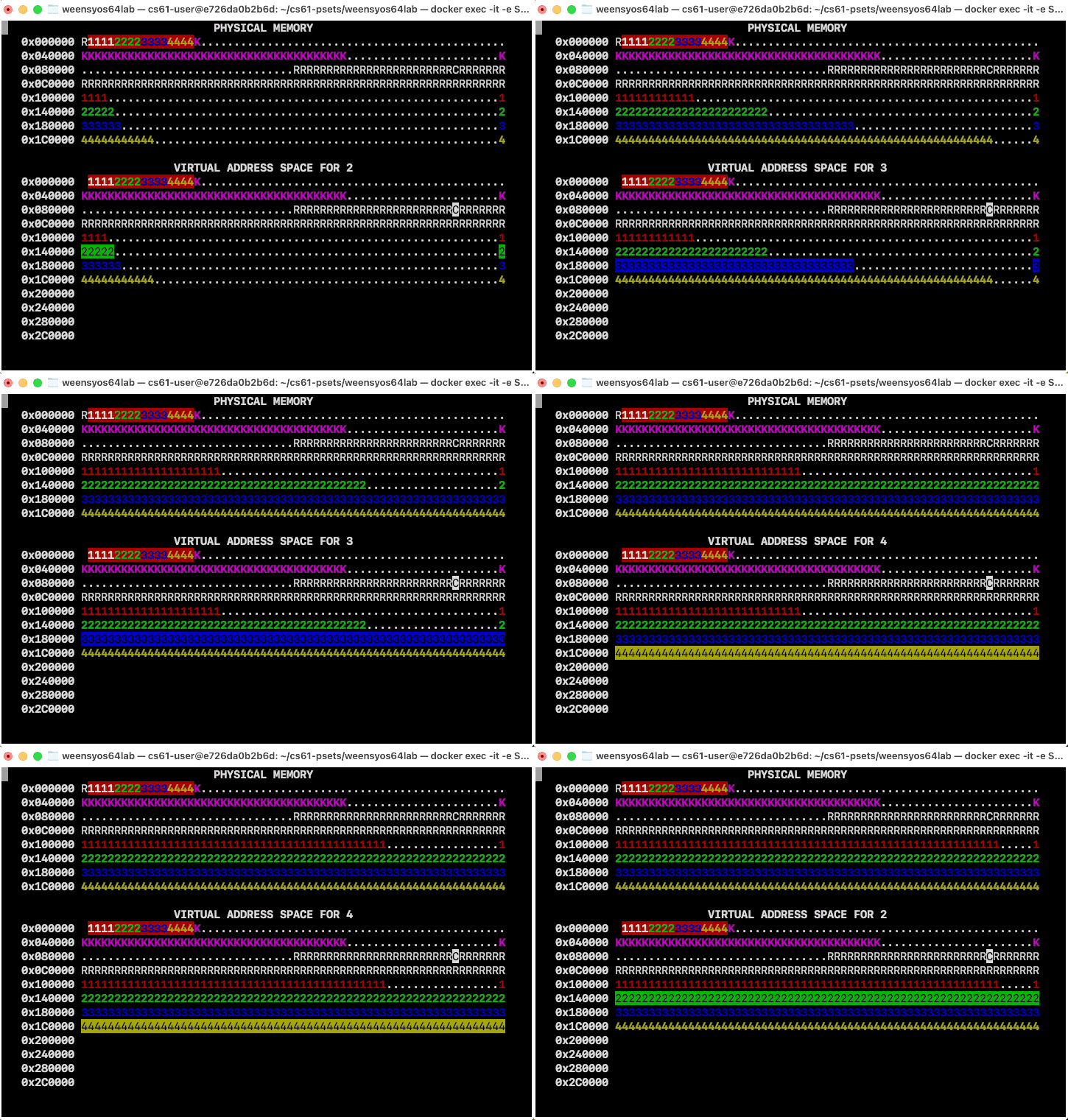
If you create an incorrect page table, WeensyOS might crazily reboot. Don’t panic; see the debugging hints above.
About program images and segments (
pgmandseg)
Phase 3: General process address spaces
So far, WeensyOS processes use identity mappings for process memory: a process code, data, stack, or heap page with virtual address X is stored in the physical page with physical address X. This is inflexible and limits utilization. Processes don’t have access to the address mapping (only the kernel does), so it should be fine for a process’s virtual address X to map to a different physical page—the process won’t be able to tell the difference. This will also enable new functionality, like running different processes with similar virtual address spaces.
Change your operating system to allocate all process data, including its code,
globals, stack, and heap, using kalloc instead of direct access to the
physpages array. This will turn the process page tables from subsets of an
identity mapping to a more general mapping, where lots of pages have different
virtual and physical addresses.
Here’s how your OS should look after this phase.
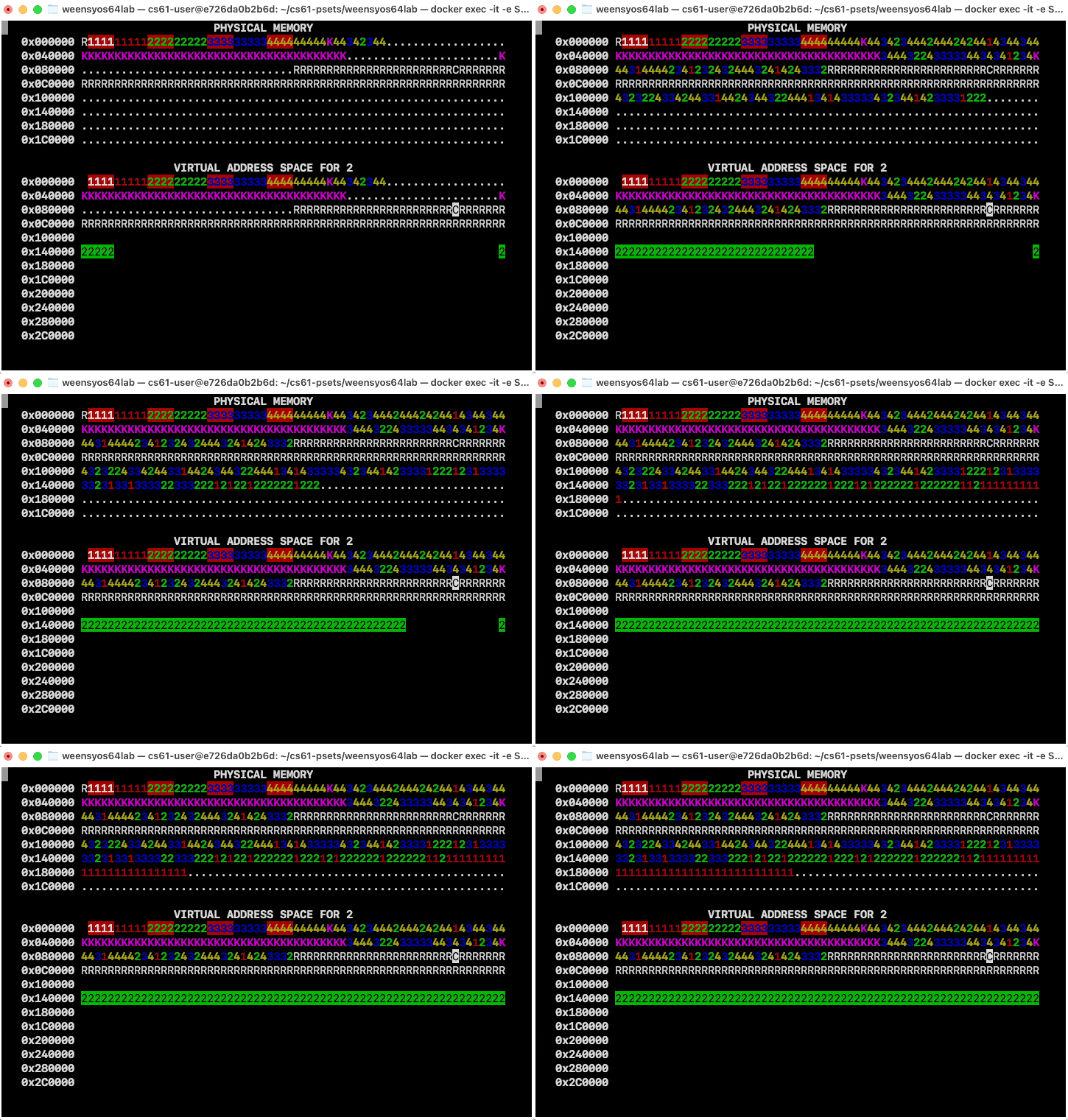
This will complicate the code that initializes process code in
process_setup. You’ll need to figure out why (hint: which page table is
being used in process_setup?) and find a way around it (hint: vmiter or
set_pagetable).
Phase 4: Nonsequential physical page allocation
In the handout code, kalloc always chooses the available physical page that
has the lowest address. This means consecutive kalloc calls typically return
consecutive physical pages. But your code should not depend on this
behavior.
Change kalloc to allocate pages nonsequentially. This can be as simple as
setting page_increment to 3 (or any larger odd number). The virtual
address spaces should work as before, though the physical memory map will look
different:
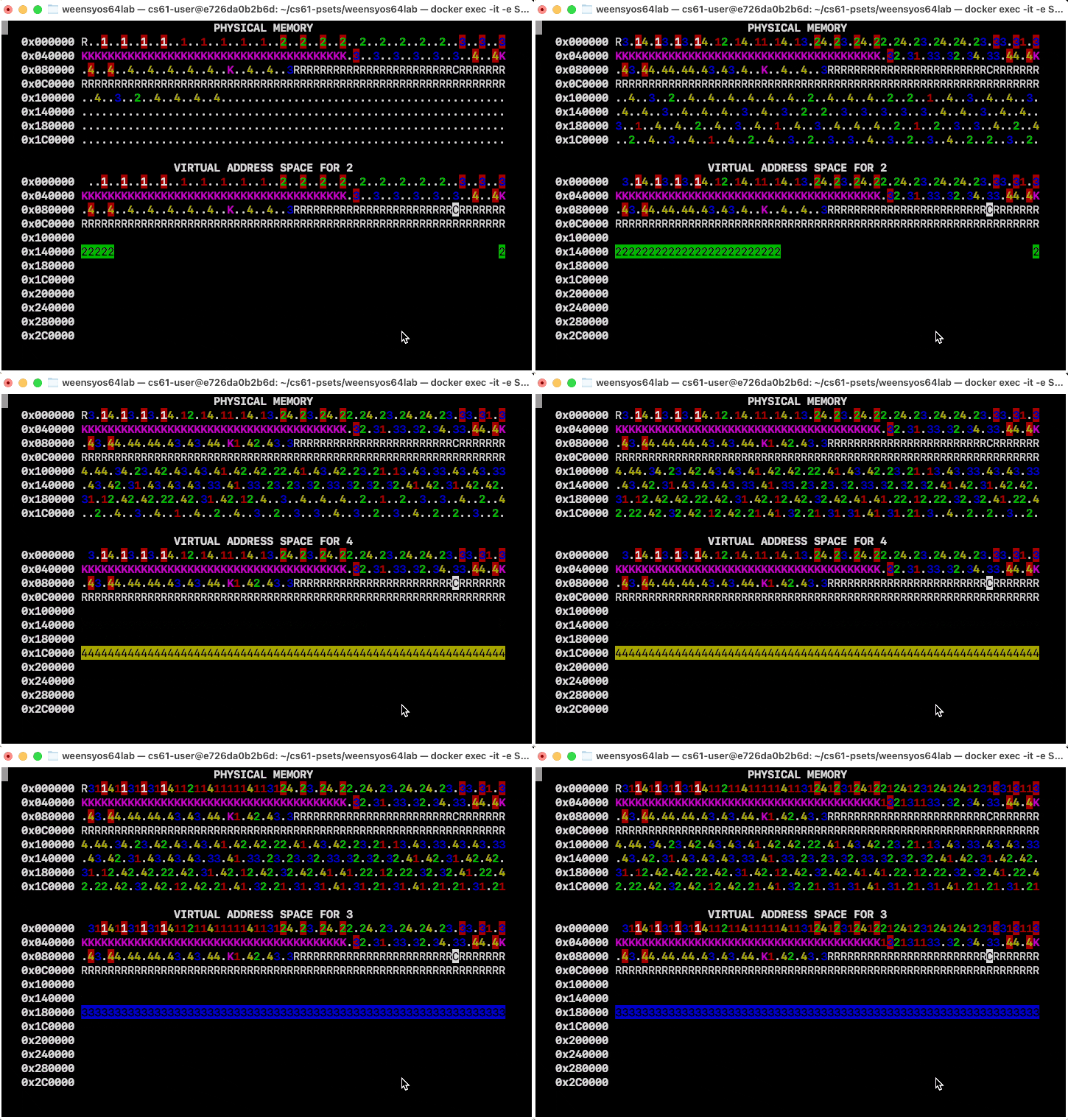
But if you see a panic—like, maybe,
PAGE FAULT on 0xcccccccccccccccc (pid 3, read missing page, rip=0xcccccccccccccccc)!
you have a problem. Go back and think again about how to copy instructions and data from program segments into process memory.
Once you’re confident in your phase 4 solution, you can go back to setting
page_increment = 1, but your code should work with any page allocation
strategy.
Phase 5: Overlapping address spaces
Now the processes are isolated, which is awesome, but they’re still not taking full advantage of virtual memory. Since they are isolated, they can use the same address ranges without conflicting on the underlying data.
In this phase, change each process’s stack to grow down from address 0x300000 == MEMSIZE_VIRTUAL. Now the processes have enough heap room to use up all of
physical memory!
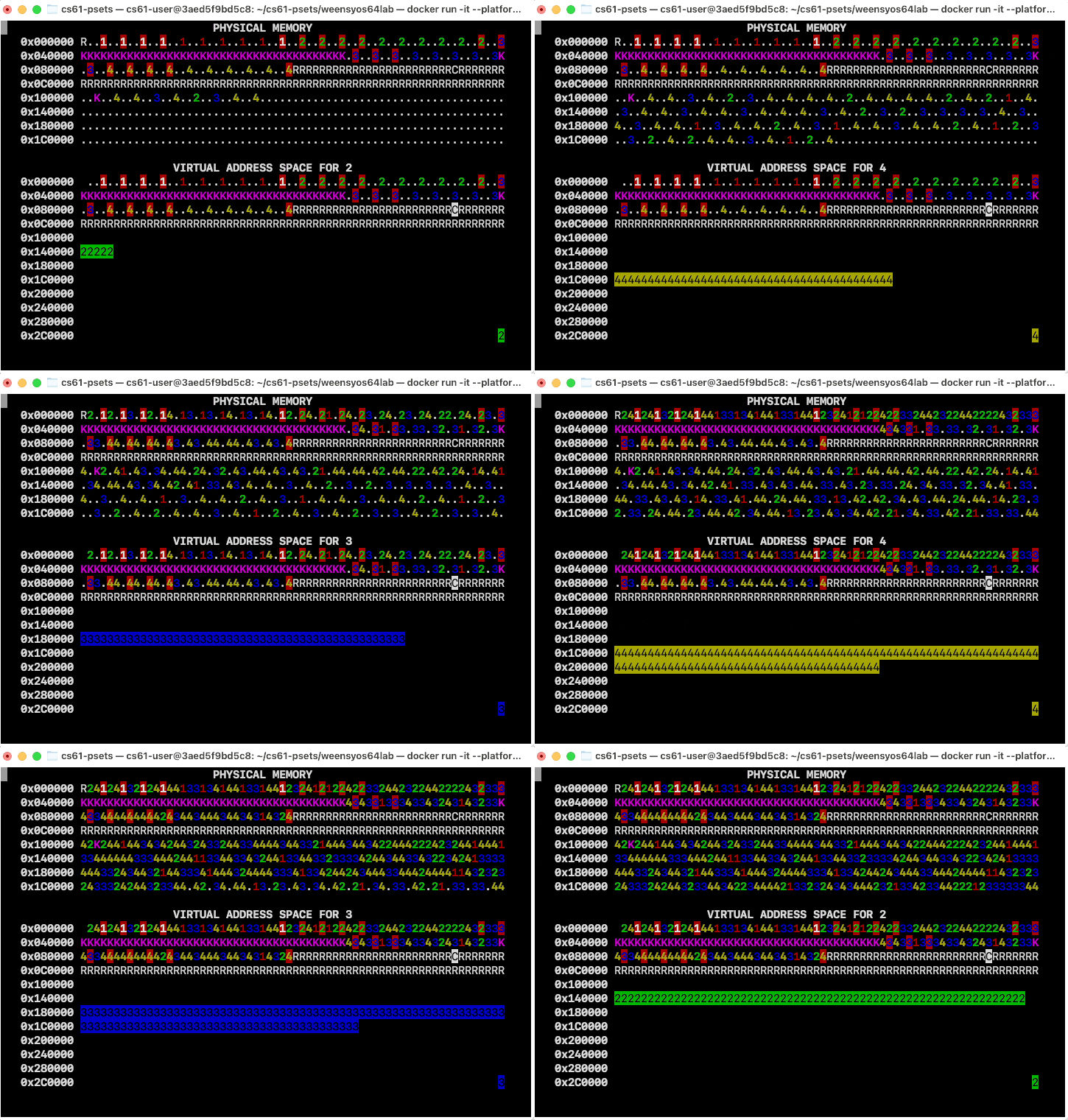
If there’s no physical memory available, sys_page_alloc should return an
error code to the calling process, such as -1. Do not kill the calling
process! Lack of memory is a potentially recoverable problem.
Debugging WeensyOS
There are several ways to debug WeensyOS. We recommend:
-
Add
log_printfstatements to your code to print log messages tolog.txt. However,log_printfwill dramatically slow down your operating system. Deletelog_printfs you don’t need to keep things snappy. -
Use assertions to catch problems early (for instance, call
check_page_tableto test a page table for obvious issues, or add your own). -
Printouts such as assertions and fault reports include the virtual address of the faulting instruction, but they do not always include symbol information, and they never contain line number information. Use files
obj/kernel.asm(for the kernel) andobj/p-PROCESSNAME.asm(for processes) to map instruction addresses to instructions.For example, here’s a backtrace for a kernel bug:
PANIC: Kernel page fault on 0x256000 (write missing page, rip=0x413ad)!
  #0  0x413ad  <_Z7syscallP8regstate>
  #1  0x40b28  <_Z13syscall_entryv>
This backtrace says that the fault happened at
%rip0x413ad, which is an instruction in thesyscall()function. It also says thatsyscall()was called bysyscall_entry(). To locate the specific instruction at issue, we checkobj/kernel.asmfor413ad, and find:current[10000].regs.reg_rax = -1; 413ad: 48 c7 80 10 bd 1f 00 movq $0xffffffffffffffff,0x1fbd10(%rax)Oops, I guess
current[10000]is out of range!A bug in process code might produce a message like this in
log.txt; unfortunately, process backtraces do not have symbols:Process 1 page fault on 0xefed937b23 (write missing page, rip=0x100015)! #0 0x100015 #1 0x10011cWe can check the
.asmfile for the relevant process (here,obj/p-allocator.asm) to decode the instructions and their containing functions, and maybe get insight into the bug:0000000000100000 <cause_trouble()>: ... void cause_trouble() { 100000: f3 0f 1e fa endbr64 heap_top[1030481984291] = 61; 100004: 48 b8 23 3b 83 ed ef movabs $0xefed833b23,%rax 10000b: 00 00 00 10000e: 48 03 05 f3 1f 00 00 add 0x1ff3(%rip),%rax # 102008 <heap_top> 100015: c6 00 3d movb $0x3d,(%rax) 0000000000100019 <process_main()>: ... cause_trouble(); 100117: e8 e4 fe ff ff call 100000 <cause_trouble()> 10011c: eb 90 jmp 1000ae <process_main()+0x95>Oops, I guess
heap_top[1030481984291]is out of range! -
Sometimes a mistake will cause the OS to crash hard and reboot. Use
make D=1 runto get additional, painfully-verbose debugging output. Search throughqemu.logforcheck_exceptionlines to see where the exceptions occur.A powerful, yet simple, technique for debugging extreme crashes is to narrow down where they occur using infinite loops. Add an infinite loop (
while (true) {}) to your kernel. If the resulting kernel crashes, then the infinite loop is after the crash point; if it infinite loops, then the infinite loop is before the crash point. When a kernel infinite-loops on Docker, you must open another terminal to the same Docker instance andmake stopto kill it.
Understanding memory errors
You may want to skip this section until you have completed the first few parts of the pset.
The WeensyOS memory viewer, which is defined in k-memviewer.cc, checks your
memory management data structures and reports any problems it sees. The
memusage::symbol_at() function chooses which symbol to display for each page
and detects some errors. Here’s what some of those symbols and error messages
mean.
-
Lpage: AnLpage has been leaked. This means that the page has been marked as used (it has a reference count greater than 0), but is not referenced by any process page table. This usually means that you’re missing atry_mapcall, you calledkallocwithout freeing or mapping the result, or you didn’t free your pages properly in phase 7. -
PAGE TABLE ERROR: nullptr physical page mapped for user: A process pagetable has mapped the physical page at address 0. This page is reserved and mapping it is illegal. Not checking the return value of
kallocis a common cause of this error. -
PAGE TABLE ERROR: reserved physical page mapped for user: Some other physical pages are reserved for special purposes, such as internal machine software and device memory. Processes aren’t allowed to map these pages.
-
PAGE TABLE ERROR: kernel data page mapped for user: Processes also aren’t allowed to map physical pages that control kernel instructions or data (that would violate kernel isolation).
-
PAGE TABLE ERROR: freed page mapped for user: A process has an active mapping for a physical page that’s currently marked as free (has refcount 0). This is invalid and dangerous, since the mapping grants access to memory that the kernel could use again at any moment.
-
PAGE TABLE ERROR: invalid reference count: A physical page has a refcount that’s unexpectedly large. In WeensyOS, page reference counts are typically limited to the range [0, MAXNPROC], where MAXNPROC is the number of processes in the system; but if your code decrements page refcounts too little or too much, the counter can easily get out of whack and overflow.
-
Unwanted
Spage: In phase 8, you should start seeingSpages, but only for pages that can be safely shared—namely, program instructions and read-only data. If you see lots ofSpages, this indicates that multiple processes are sharing the same writable memory, which is unsafe. (Copy-on-write extra-credit will show a lot ofSpages.)
The WeensyOS exception handler will also print messages on page faults,
which indicate that process memory accesses went wrong.
-
PAGE FAULT on <PTR> (pid N, read protection problem, rip=<RIP>: A process is trying to read a virtual address that has a kernel-only mapping (not
PTE_P|PTE_U). This likely means you haven’t mapped a page with the correctPTE_PWUpermissions. Other messages include:- write protection problem: The process tried to write a page that is
present, but unwritable (not
PTE_P|PTE_W|PTE_U). - read missing page: The process tried to read a page that is not present.
- write missing page: The process tried to write a page that is not present.
<PTR> gives the address whose access failed, and <RIP> is the address of the instruction that tried to access that address.
- write protection problem: The process tried to write a page that is
present, but unwritable (not
Turnin
You will turn in your code by pushing your git repository to github.com/cs61/YOUR-PSET_REPO.git and updating the grading server.